5,000+
Students Trained
100%
Placement Assistance
4.8 ★
Verified Reviews
150+
Hiring Companies
15+ yrs
Trainer Experience
— The most practical Video Editing course in Hyderabad
Video Editing Is More Than Just Learning Software
Our Video Editing Course in Hyderabad is designed for students, freshers, content creators, freelancers, YouTubers, and working professionals who want to learn video editing from the beginning. You don't need any previous experience. We teach you step by step through practical training and real projects.
Learning video editing is not just about using software. A professional video editor knows how to tell a story, choose the right music, improve colours, create smooth transitions, and keep viewers engaged from beginning to end. In our Video Editing Course in Hyderabad, you will learn these practical skills through real projects, so you can confidently work on YouTube videos, social media content, advertisements, wedding films, and business videos.
Our Video Editing Course in Hyderabad includes 1 month of practical classroom training followed by a 1 - month internship on real client projects. You will learn DaVinci Resolve, Adobe Premiere Pro, After Effects, CapCut, Adobe Audition, and the latest AI-powered editing tools used in the industry. During the course, you will complete 5 real projects, build a professional portfolio, and gain practical experience that helps you prepare for video editing jobs and freelance opportunities.
The course is led by Ravi Varma, who has 15+ years of industry experience, and Ambica Kiran, who has 8+ years of training experience. They guide you step by step using real client projects, practical classes, and hands-on practice. Choose the learning mode that suits you best. Join the course online from anywhere, attend offline classes at our JNTU Metro campus, or learn through a hybrid mode that combines both online and classroom training.
Video Editing Career Opportunities in Hyderabad
Today, video editing is one of the fastest-growing career skills in Hyderabad. Businesses, YouTubers, digital agencies, content creators, startups, and brands are looking for skilled video editors. Beginners can start with entry-level jobs or freelance projects, and as their skills and portfolio improve, they can earn higher-paying opportunities. For example, YouTube video editors can earn around ₹15,000 to ₹1,00,000 per video, brand commercial projects can pay ₹30,000 to ₹2,00,000, and wedding video editing projects can earn ₹50,000 to ₹3,00,000 per event.
Our goal is to help you build strong video editing skills and prepare you for better career opportunities. During the course, you will create real projects, build a professional portfolio, complete an internship, and learn how to work with clients. Whether you want a full-time job, freelance projects, YouTube editing, or wedding video editing, this course gives you the practical skills to start your career with confidence.
— The signature framework of this course
Understanding the 6 Layers of Professional Video Editing
Every professional video edit is built in layers. If you open a project in DaVinci Resolve or Adobe Premiere Pro, you'll see the same six layers in the timeline: video, music, voice-over, sound effects (SFX), subtitles, and colour. Each layer plays an important role in creating a professional video. When you learn and master all six layers, you build the skills needed to become a confident video editor.
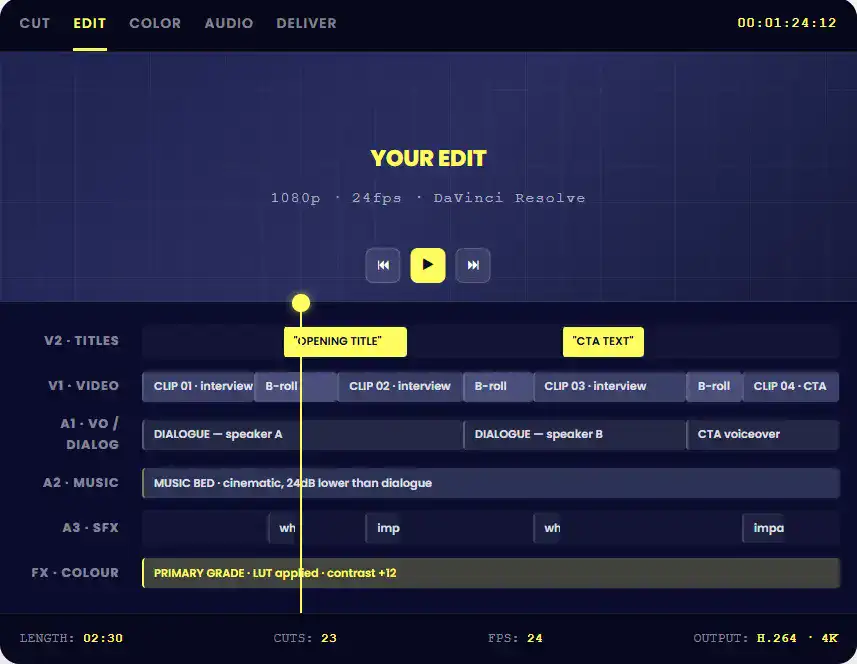
6 CRAFT PILLARS
What Makes the Difference Between a ₹500 Edit and a ₹50,000 Edit?
The software may be the same, and the video clips may be the same. What makes a real difference is how well a video editor uses these six layers. Every layer has an important purpose, and each one is covered in a separate module of this course to help you build professional video editing skills.
✂️ Cutting & pacing
MODULE 04
Learn different editing techniques like L-cuts, J-cuts, match cuts, and jump cuts. You'll also learn how to improve video flow, remove unnecessary clips, and create smooth, engaging edits that keep viewers watching.
🔊 Audio editing
MODULE 05
Learn why audio is more important than visuals in many videos. You'll learn how to set dialogue around -12dB, keep background music around -24dB, remove unwanted noise, and choose the right music to make your videos sound clear, balanced, and professional.
🎨 Colour grading
MODULE 06
Learn the difference between colour correction (fixing colours) and colour grading (creating a visual style). You'll also learn how to use scopes, primary colour correction, and LUTs in DaVinci Resolve to give your videos a professional look.
✨ Motion graphics
MODULE 07
Learn how to create lower thirds, animated titles, callouts, and brand animations using Adobe After Effects and Fusion. These motion graphics help make your videos more creative, engaging, and professional.
🎭 VFX & compositing
MODULE 08
Learn green screen editing, object tracking, rotoscoping, and compositing using professional tools. These advanced editing skills help you create high-quality videos with realistic visual effects.
🤖 AI-augmented workflow
MODULE 09
Learn how to use AI tools like Submagic, Captions.ai, Adobe Enhance Speech, and AI Scene Detection to edit videos faster and improve your workflow. Discover how AI can help you save time while creating high-quality videos.
— Choosing your video track
Four video courses, four different careers
Digital Brolly offers different video-related courses to match different career goals. Whether you want to become a professional video editor, create AI videos, grow a YouTube channel, or build your Instagram presence, you can choose the course that fits your career plan. You can also combine two or more courses with our bundle to build complete video production skills.
YOU ARE HERE
Craft: editing skill
Video Editing
Master DaVinci Resolve, Premiere Pro, After Effects, VFX, colour grading, and motion graphics.
Best for
Pro editors, YT editors for creators, wedding/event editors
Generation: AI tools
AI Video Generator
Create AI videos using Runway, Pika, Sora, HeyGen, Suno, and other AI tools.
Best for
Content creators, marketers using AI-first video
Strategy: channel growth
YouTube Marketing
Learn YouTube SEO, thumbnails, monetisation, content strategy, and channel growth.
Best for
YouTubers, course creators, B2B content marketers
Strategy: short-form
Instagram Marketing
Learn Reels, Instagram growth, content strategy, ads, and audience engagement.
Best for
Creators, D2C brands, visual marketers
⚡ Most popular video bundle
Video Editing + AI Video Generator for ₹25,000 (save ₹5,000)
— 12 Modules · 60+ Hours · Edit something every week
Video Editing Curriculum
Our Video Editing Course curriculum is designed to help you learn step by step through practical training. Every module includes hands-on practice and real projects. By the end of the course, you will complete 5+ portfolio projects, including YouTube videos, Shorts, talking-head videos, wedding reels, and brand commercials.
MODULE 01
Foundations
The Video Editing Landscape in 2026
- Introduction to the Video Editing Industry
- Popular video editing software: DaVinci Resolve, Premiere Pro, Final Cut Pro, and CapCut
- Computer and hardware requirements for video editing
- Career opportunities, salaries, and industry demand
- How to choose the right video editing career path
MODULE 02
DaVinci core
DaVinci Resolve Mastery
- Why DaVinci Resolve is the best free professional tool
- Interface tour: Cut, Edit, Fusion, Color, Fairlight, Deliver
- Project setup, media management, proxy workflows
- Keyboard shortcuts and editing speed
- Used on Hollywood films and Netflix productions
MODULE 03
Premiere essentials
Adobe Premiere Pro
- The industry-standard software (most agencies run it)
- Premiere vs DaVinci — when each wins
- Project setup, workspace customisation
- Sequence settings, importing, organising
- Premiere → After Effects roundtrip
MODULE 04
Cutting craft
Cutting & Editing Techniques
- The 3-act structure for video
- L-cuts and J-cuts (the foundation)
- Match cuts, smash cuts, jump cuts
- Pacing — the most overlooked skill
- The "delete this and see if it matters" rule
MODULE 05
Audio mix
Audio Editing & Mixing
- Why audio matters MORE than visuals
- Levels: dialogue at -12dB, music at -24dB
- Noise reduction (huge skill, separates pros from amateurs)
- Music selection and licensing
- Sound design basics
MODULE 06
Colour grade
Colour Correction & Grading
- Correction (fixing) vs Grading (style)
- Scopes: waveform, vectorscope, parade
- Primary correction: lift, gamma, gain
- Secondary correction (skin tones, sky)
- LUTs and creative grading
MODULE 07
Motion graphics
Motion Graphics & Titles
- Lower thirds and animated titles
- Animation principles in After Effects + Fusion
- Subtitle workflows (Submagic, manual)
- Animated callouts and emphasis
- Brand identity in motion
MODULE 08
5 formats
Format-Specific Editing
- Long-form (10-30 min YouTube)
- Short-form (Reels, Shorts, TikTok)
- Ads (15s, 30s, 60s structures)
- Documentary style
- Wedding / event highlights
MODULE 09
AI workflow
AI-Augmented Editing
- Auto-cut tools (Submagic, Captions.ai)
- AI noise removal (Adobe Enhance Speech)
- AI colour grading workflows
- AI scene detection for fast assembly
- The "AI as production assistant" workflow
MODULE 10
VFX basics
Visual Effects (VFX) Basics
- Green screen / chroma key
- Object tracking and motion graphics
- Rotoscoping basics
- Compositing in Fusion / After Effects
- When to do VFX yourself vs outsource
MODULE 11
Client workflow
Workflow & Project Management
- Editorial workflow for clients
- Versioning and revisions (Frame.io)
- Delivery formats and codecs
- File management (the unsexy skill that matters)
- Client communication during projects
MODULE 12
5 capstones
Career Path & Capstones
- 5 real capstone editing projects (see Projects section)
- Building your reel/portfolio that lands clients
- Pricing freelance video editing
- YouTube editing as a career path (the booming niche)
- Career paths: in-house vs agency vs freelance
— 15+ tools · The complete editor's stack
The full video editor's stack
Learn the professional video editing tools used by agencies, content creators, and businesses. During the course, you'll get hands-on practice with every tool and understand where and how to use it in real projects.
Primary Editors 4 tools
DaVinci Resolve
Free pro
Premiere Pro
Industry std
Final Cut
Mac only
CapCut
Mobile + web
Motion Graphics & VFX 2 tools
After Effects
Motion GFX
Fusion
DaVinci VFX
Audio 3 tools
Adobe Audition
Pro audio
Fairlight
DaVinci audio
Audacity
Free editor
AI Editing Tools 3 tools
Submagic
AI subtitles
Captions.ai
AI cuts
Enhance Speech
Adobe AI
Colour & Grading 2 tools
DaVinci Color
Industry std
Lumetri
Premiere
Review & Delivery 2 tools
Frame.io
Client review
Wipster
Approvals
— Practising professionals · Editing real projects weekly
Learn from trainers who edit live client projects every week
Both trainers work on real client video editing projects and teach the same skills they use in their daily work. This helps you learn practical video editing techniques that are used in the industry today.
Lead Trainer
Ravi Varma
Founder, Digital Brolly · 15+ yrs · 5,000+ students trained
Ravi has been editing video content for clients across education, dental, real estate, B2B SaaS, and D2C since 2017. His current portfolio includes long-form YouTube videos, Shorts, brand commercials, and ad campaigns for 8+ active client brands — all built using DaVinci Resolve and Premiere Pro with the AI-augmented workflow you'll learn here.
Founder of Brolly AI, Snowflake Masters, and Generative AI Masters — actively producing video content weekly across personal brand and client accounts.
15+ yrs Digital Marketing
DaVinci + Premiere
5,000+ Students
Active Editor
Senior Video Editing Trainer
Ambica Kiran
Senior Trainer · 8+ yrs · Post-production specialisation
Ambica brings 8+ years of practical training experience and specialises in the post-production craft side — colour grading in DaVinci, motion graphics in After Effects, audio mixing, and the editing fundamentals (cuts, pacing, story). She runs the hands-on workshops where students ship their first portfolio-ready edit.
Known for her structured, beginner-friendly teaching approach — making complex DaVinci and AE workflows accessible to students with zero prior video background.
8+ yrs Training
DaVinci Specialist
After Effects
1-on-1 Mentoring
—By the end of 2 months you can
Skills You Will Gain After This Video Editing Course
By the end of this course, you'll have the practical skills to edit different types of videos, build a strong portfolio, and work confidently on real client projects.
🎬
Edit long-form YouTube videos
10-30 minute interview, talking-head, or tutorial videos. Hook structure, pacing, B-roll integration, retention engineering.
📲
Produce Reels & Shorts
Vertical 9:16 edits with subtitles, hooks, beats matching audio. Fast turnaround, agency-ready quality.
🎯
Cut brand commercials & ads
15s, 30s, 60s ad edits with motion graphics, colour grading, and tight pacing. ₹15K-50K market rate per ad.
💒
Edit wedding highlight reels
3-5 minute cinematic wedding edits with colour grading, music sync, and emotional pacing. ₹50K-3L per event.
🎨
Grade colour like a professional
Primary correction with scopes, secondary correction (skin tones, sky), creative grading with LUTs. The DaVinci specialty.
✨
Animate motion graphics & titles
Lower thirds, animated callouts, brand identity motion graphics in After Effects and Fusion. Adds 30%+ to project rates.
— Logistics & portfolio
Batch details & capstone projects
Everything you need to know before joining the course, including batch timings, course duration, internship, certifications, and the real projects you'll complete during your training.
📅 Upcoming batch details
| Course Duration | 1 Month Practical Training |
|---|---|
| Internship | 1 Month (Real Client Editing) |
| Placement | 100% Placement Assistance |
| Certifications | Brolly + 3 Industry |
| Next Batch | 3rd August 2026 · 5:00 PM |
| Class Schedule | Mon–Fri · 1.5 hrs/session |
| Modes | Online · Offline · Hybrid |
| Trainers | Ravi Varma + Ambica Kiran |
| Location | JNTU Metro Pillar A689 |
| Languages | English · Hindi · Telugu |
🎯 5 Capstone editing projects
PROJECT 01
60-Second YouTube Ad
Full ad edit: voiceover, music, motion graphics, colour grading, CTAs. Same deliverable agencies sell at ₹15K-50K.
PROJECT 02
10-Minute Long-Form YouTube Video
Interview or talking-head edit with B-roll, retention pacing, audio mix, subtitle overlay. ₹5K-15K market rate.
PROJECT 03
5-Reel/Shorts Vertical Series
5 vertical 9:16 edits with hooks, captions, music, beat-synced cuts. The YouTube editor / Reels editor's bread and butter.
PROJECT 04
Wedding/Event Highlight Reel
3-5 minute cinematic edit with colour grading, music sync, emotional pacing. ₹50K-3L per event in the wedding cinematography market.
PROJECT 05
Brand Commercial (15-30s with VFX)
High-production commercial with green screen, motion graphics, colour grading. The portfolio piece that lands premium clients.
— 4.8★ on Google · Justdial · 100s of verified reviews
What our students say about Digital Brolly's video editing training
Real reviews from our 5,000+ students who learned through practical training, real projects, internships, and expert guidance at Digital Brolly.
"I was editing for ₹2K per video on Fiverr — burnt out, unsustainable. The course pushed me into the YouTube editor niche. Within 2 months of finishing, I had 4 retainer creators paying ₹25K each per month. Now I'm at ₹1.4L/month editing 16 videos a month from home. The honesty about specialisation changed everything."

"DaVinci Resolve module alone was worth the fee. Coming from Premiere I was sceptical about switching. After Module 02 + 06, I now edit 30% faster in DaVinci and my colour work looks completely different. Got hired by a Hyderabad ad agency at ₹6.5 LPA — they specifically wanted a DaVinci editor."

"I'm a wedding photographer who wanted to add cinematography. The wedding highlight module + colour grading completely changed what I deliver. Now my packages are ₹85K-2L per event vs ₹40K before — same work, way better edits, more demand. Fully booked 6 months out."
— 150+ companies have hired or interviewed Digital Brolly candidates
Hiring companies looking for video editing talent
Our hiring network includes digital agencies, startups, IT companies, brands, content creators, and media companies looking for skilled video editors. After completing the course, you'll receive placement assistance to help you explore job opportunities with our hiring network.
— Realistic CTC bands · Hyderabad · 2026
What video editors actually earn
Explore the average salary of video editors in Hyderabad based on experience, skills, and job roles. These salary ranges give you a realistic idea of the career opportunities available after learning video editing.
| ROLE | EXPERIENCE | CTC BAND | WHAT YOU DO |
|---|---|---|---|
| Junior Video Editor | 0–1 yr | ₹2–5 LPA | Entry-level edits at agencies. Cuts, basic colour, simple motion graphics. Learning the workflow. |
| Video Editor (in-house) | 1–3 yrs | ₹3–7 LPA | D2C brand or agency in-house. Multiple format editing, ads, social content, brand videos. |
| YouTube Editor for creators | 1–4 yrs | ₹4–12 LPA | Premium niche. Edit for 1-3 creators. ₹15-50K per video × 8-16 videos/month. Booming category. |
| Motion Graphics Designer | 2–5 yrs | ₹5–15 LPA | After Effects specialist. Animated logos, brand identity motion, explainer animations. |
| Senior Video Editor | 3–5 yrs | ₹6–12 LPA | Complex edits, lead post-production for major projects, junior editor mentoring. |
| Wedding Cinematographer | Any | ₹6–25 LPA | ₹50K-3L per event × 12-24 events/year. Highest income ceiling for craft-focused editors. |
| Freelance Editor (specialist) | Any | ₹6–30 LPA | YT creators, D2C brands, B2B SaaS niche. ₹15K-1L per video × multiple clients. |
| Lead Editor / Post-Production Lead | 5+ yrs | ₹8–18 LPA | Lead post-production team at agencies. Strategy, vendor relationships, quality control. |
Source: Aggregated from Naukri Jobspeak Index, Glassdoor Hyderabad data, freelance platform rate surveys (Upwork, Contra, Behance), wedding photography industry reports, and creator economy compensation data. Bands are indicative ranges, not guaranteed salaries.
— Transparent pricing · No hidden fees · EMI available
Video Editing course fees in Hyderabad
Choose the learning option that works best for you. We offer flexible payment plans, classroom and online training, and full placement assistance to help you start your video editing career with confidence.
Brolly Video Editing Course
Everything you need · Nothing extra to pay
₹15,000 ₹35,000 elsewhere
- 1 month practical training (60+ hours)
- 1 month internship editing real client projects
- Brolly Video Editing Specialist Certificate
- Guidance on 3 industry certifications (free)
- Lifetime access to all class recordings
- 1-on-1 mentoring with Ravi Varma & Ambica Kiran
- 5 capstone editing projects in your portfolio
- The 6-pillar craft framework documented
- Placement assistance with referrals to our 150+ hiring network
- EMI options across 3 months — no extra cost
Video Editing + AI Video
The complete 2026 video skillset — edit footage like a pro AND generate footage with AI. Take both for ₹25,000 — save ₹5,000.
Save ₹5,000
Creative Bundle
Video Editing + Graphic Design (the 2 Creative cluster courses) for ₹25,000 — save ₹5,000. Ideal for creative generalists.
Save ₹5,000
3-month EMI
Pay ₹5,000 per month across 3 months. No interest, no extra charges.
₹5,000/mo
— Open to anyone with basic computer skills
Who is this Video Editing course for?
This course is designed for beginners, students, freshers, freelancers, content creators, photographers, videographers, and working professionals. No prior video editing experience is required—just basic computer skills and a willingness to learn.
🎬 Aspiring professional editors
The clearest career path: ₹2-5 LPA junior → ₹3-7 LPA mid → ₹6-12 LPA senior in 3-5 years. Craft-based skill that compounds.
▶️ YouTube editors for creators
The booming 2026 niche. Top creators outsource editing at ₹15K-1L per video. 4 retainer creators = ₹1L+/month income.
💒 Wedding & event videographers
Already shooting? Add proper post-production craft and your packages double. Wedding cinematography is one of the highest-paying niches.
📸 Photographers adding video
Photographers already get hired — adding video doubles your average project value. Editing is the multiplier skill that locks in repeat clients.
🎓 Students & freshers
Final-year students wanting a directly-employable craft skill. Clear path to ₹2-5 LPA junior roles, with rapid progression based on portfolio quality.
🏠 Career switchers & home-based workers
Video editing is one of the most accessible work-from-home careers. All you need is a laptop. Fully remote, fully flexible, scalable income.
— Honest answers to the questions every prospect asks
Video Editing course in Hyderabad FAQs
Find answers to the most common questions about our Video Editing Course in Hyderabad, including course duration, fees, software, internship, certification, placements, and career opportunities. If you need more information, our team is happy to help.
What is the Video Editing course in Hyderabad about?
The Video Editing Course at Digital Brolly is a 1-month practical training followed by a 1-month internship editing real client video projects. The course covers 12 modules across DaVinci Resolve and Premiere Pro mastery, cutting and pacing techniques, audio editing and mixing, colour correction and grading, motion graphics with After Effects and Fusion, VFX basics, AI-augmented editing tools (Submagic, Captions.ai), format-specific editing (long-form YouTube, Reels/Shorts, ads, weddings), and professional client workflows. Students build 5 capstone projects including a YouTube ad, long-form video, Shorts series, wedding highlight reel, and brand commercial.
Which video editing software will I learn?
You'll master DaVinci Resolve (the free professional tool, Modules 02 + 06) — the same software used on Hollywood films and major Netflix productions. You'll also learn Adobe Premiere Pro (the industry-standard, Module 03), Adobe After Effects for motion graphics (Module 07), and CapCut for fast Reels/Shorts editing (Module 08). DaVinci Resolve is the deepest focus because it's free, professional-grade, and increasingly the standard for serious editors. Premiere Pro is taught for industry compatibility — most agencies still run it.
Do I need a powerful computer for video editing?
Honest answer: you can start the course on any modern laptop with at least 8GB RAM and a recent processor. For learning DaVinci Resolve and editing 1080p footage, that's enough. For 4K editing, motion graphics in After Effects, and serious colour grading work, you'll eventually want 16GB+ RAM and a dedicated graphics card (M-series Mac, or PC with GTX 1660+/RTX). The course will teach you what to upgrade and when. Many students start on laptops they already own and only upgrade after their first paid client project.
How is this different from the AI Video Generator course?
The AI Video Generator Course teaches you to generate video with AI tools (Runway, Pika, Sora, HeyGen) — the focus is text-to-video creation. The Video Editing Course teaches you the craft of editing video footage — cuts, audio, colour grading, motion graphics, VFX. You're working with actual recorded or sourced footage rather than AI-generated content. They're complementary skills. Many students take both for the strongest 2026 video skillset.
How is this different from the YouTube Marketing course?
The YouTube Marketing Course is about channel strategy — niche, SEO, thumbnails, monetisation. Video editing is one part of it but not the focus. The Video Editing Course is the deep editing craft — DaVinci Resolve mastery, colour grading, motion graphics, VFX, multi-format editing. If you want to BE a video editor (in-house, agency, freelance, YouTube editor for creators), take this course. If you want to run your own YouTube channel, take YouTube Marketing. Best combination: both, especially if you want to be a YouTube editor for creators (₹4-12 LPA premium niche).
Who can join the Video Editing course?
Anyone with basic computer skills can join — no prior editing background required. The course is designed for aspiring professional video editors, content creators wanting to edit their own and client content, YouTube editors (the booming creator economy niche), wedding and event videographers wanting to upskill, marketers adding video editing to their toolkit, career switchers from journalism or photography backgrounds, and students wanting a craft-based 2026 skillset.
What is the fee of the Video Editing course?
The Video Editing Course in Hyderabad at Digital Brolly is ₹15,000 inclusive 3 of GST. EMI options across 3 months are available at no extra cost. The fee includes 1-month training, 1-month internship, Brolly certification, lifetime access to recordings, 1-on-1 mentoring, and placement support.
What jobs can I get after the Video Editing course?
Roles include: Junior Video Editor (₹2-5 LPA), Video Editor in-house (₹3-7 LPA), YouTube Editor for creators (₹4-12 LPA — premium niche), Motion Graphics Designer (₹5-15 LPA), Senior Video Editor (₹6-12 LPA), Lead Editor / Post-production Lead (₹8-18 LPA). Freelance editors earn ₹6-30 LPA equivalent across multiple clients. Wedding cinematographers earn ₹6-25 LPA on per-event pricing. The biggest opportunity in 2026: YouTube creator editing — top creators outsource editing at ₹15,000-1 lakh per video.
Can I become a freelance video editor after this course?
Yes — freelance video editing is a strong career path. Realistic income depends on niche: low-rate generalist work pays ₹500-2,000 per video, while specialist editing (YouTube creators, D2C brands, wedding cinematography, B2B SaaS) pays ₹15,000-1 lakh per project. With 4-6 retainer clients, freelance editors commonly earn ₹6-30 LPA equivalent. The course teaches you to specialise quickly into a niche where craft skill commands premium rates — not race to the bottom on platforms like Fiverr.
What tools will I learn in the Video Editing course?
You'll work hands-on with DaVinci Resolve (free professional tool, primary focus), Adobe Premiere Pro (industry standard), Adobe After Effects (motion graphics), CapCut (Reels/Shorts editing), Submagic and Captions.ai for AI auto-subtitles, Adobe Audition for audio editing, Audacity (free audio), Frame.io for client review and approval, and various LUT and music libraries. The complete modern video editor's stack.
Will I get a certificate after the Video Editing course?
Yes. You receive a Digital Brolly Video Editing Specialist Certificate on course completion, plus we guide you through earning Adobe Certified Professional credentials (Premiere Pro, After Effects), Blackmagic DaVinci Resolve certifications (free), and Frame.io workflow certifications — adding 3+ industry-recognised certifications to your resume.
How long is the Video Editing course?
The Video Editing course is 1 month of practical training followed by a 1-month internship — total 2 months commitment. Classes run for 1 to 1.5 hours per session, 5 days a week (Monday to Friday) in offline, online live, or hybrid modes. Most students also dedicate 1-2 hours of practice editing time outside class — video editing is a craft skill that improves with reps.
Is the Video Editing course available online?
Yes. The Video Editing Course is available in three modes: Online Live (instructor-led via Zoom with shared screen for live software demos and timeline walkthroughs), Offline at our JNTU Metro Hyderabad classroom, and Hybrid (mix of both). All modes get the same syllabus, same trainers, same internship editing real client projects, and same placement support.